Real - A Sports Mobile App
Helping Sports Fans Find the Fun From Day One
Context
Real is a social sports app combining live sports engagement, digital card collecting, and social competition where your sports knowledge actually pays off through virtual rewards. Despite offering these engaging features, new users struggled to find and understand these core features, leading to hesitation.
My Role
I led the redesign to solve the discovery problem, redesigning key user flows and onboarding experience to help new users immediately understand and engage with Real's core features while improving the overall experience for existing users.
Platform
Mobile
Roles
Design Lead
Skills
Interaction Design
Interface Design
Interactive Prototyping
Duration
3 Weeks
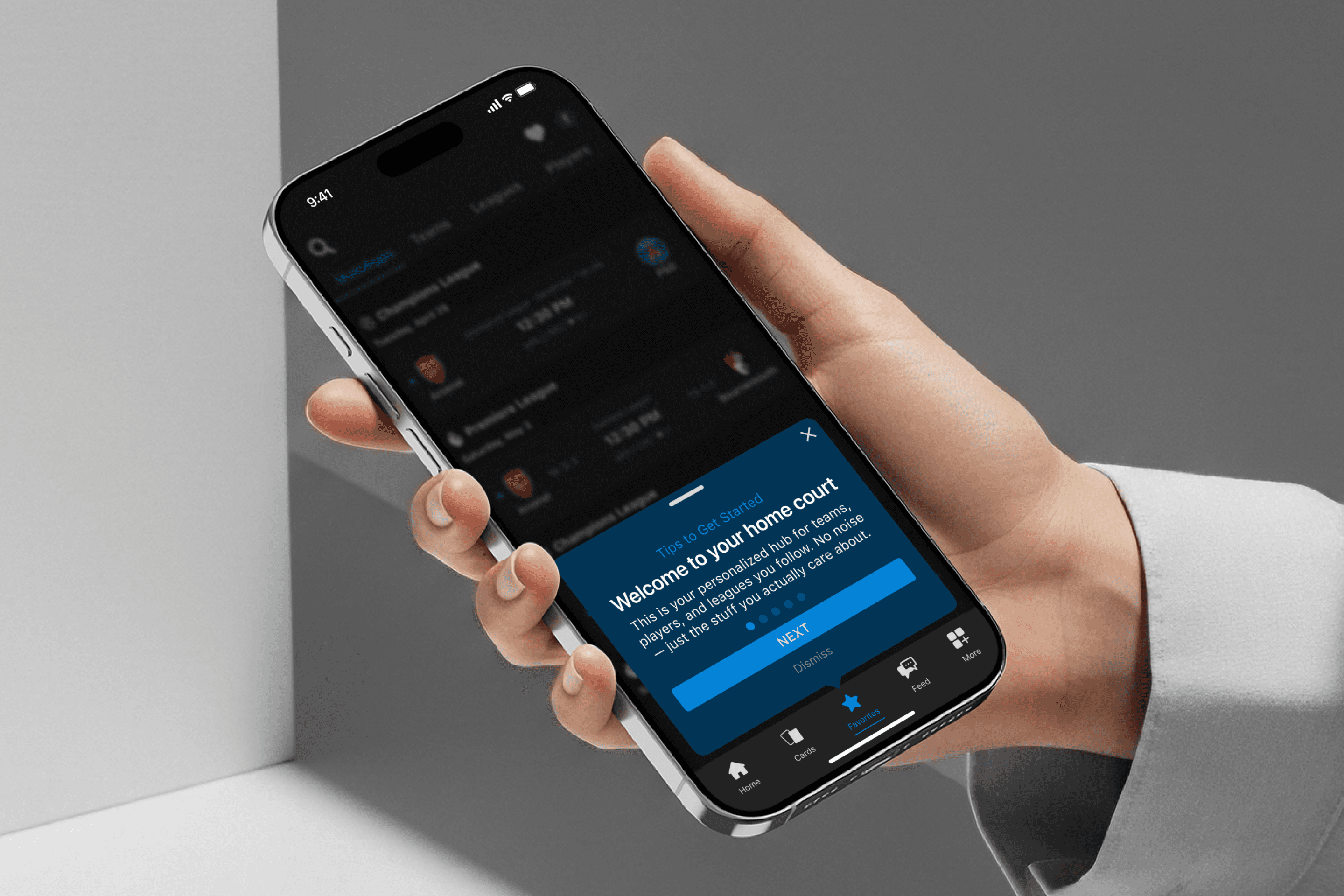
The Problem
Picture This:
You download Real, excited to track live sports and connect with fans. But instead of clarity, you’re met with unlabeled icons and no explanation of how to engage or collect Real's virtual currency. The app feels full of promise, yet you don’t know where to start. That excitement quickly turns into hesitation.
Even longtime users struggled with cluttered UI and discovering core features far too late.
The Challenge at Hand
Research
Listening to Users and Auditing the Experience
Long-term users said they didn’t understand the Rax/Karma system at first, leaned towards reddit communities for help.
New users who initially downloaded the app for the live scores/data were overwhelmed with the amount of information on the home page.
Identifying Usability Issues
Beyond user interviews, I performed a heuristic evaluation of Real's main interface to identify specific design elements contributing to user confusion.
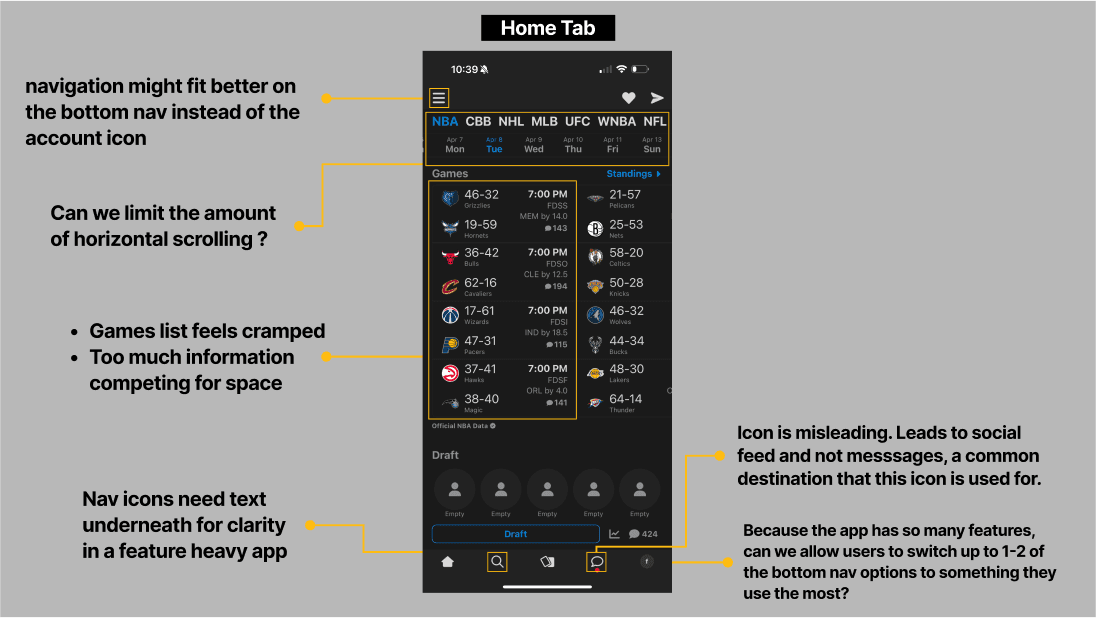
The audit confirmed user feedback with concrete examples: icon-only navigation provided no context clues, dense information competed for attention without clear priority, and core features like card collecting were buried in unclear sections. These findings directly informed my redesign priorities.
Turning Problems into Design Principles
These insights shaped three core priorities that guided every design decision.
Spark Value Early
Users should feel the excitement of Real within their first session. That meant introducing core features up front and ensuring the first tap connected fans to the fun of following teams, collecting cards, and earning rewards.
Guide Without Overwhelming
Onboarding should build confidence, not cognitive load. By surfacing preferences step by step, users feel supported and oriented without being bombarded by choices or jargon.
Clarity Over Clutter
Every screen should make it obvious where users are and what they can do next. In a feature-rich product, the value of Player Cards, Karma, and Rax only matters if users can actually find and understand them.
Design Process
The path from research insights to final design wasn't linear. Each interface decision emerged from wrestling with a fundamental question: how do you make a feature-rich app feel simple without losing what makes it special?
Solving the Onboarding Guidance Gap
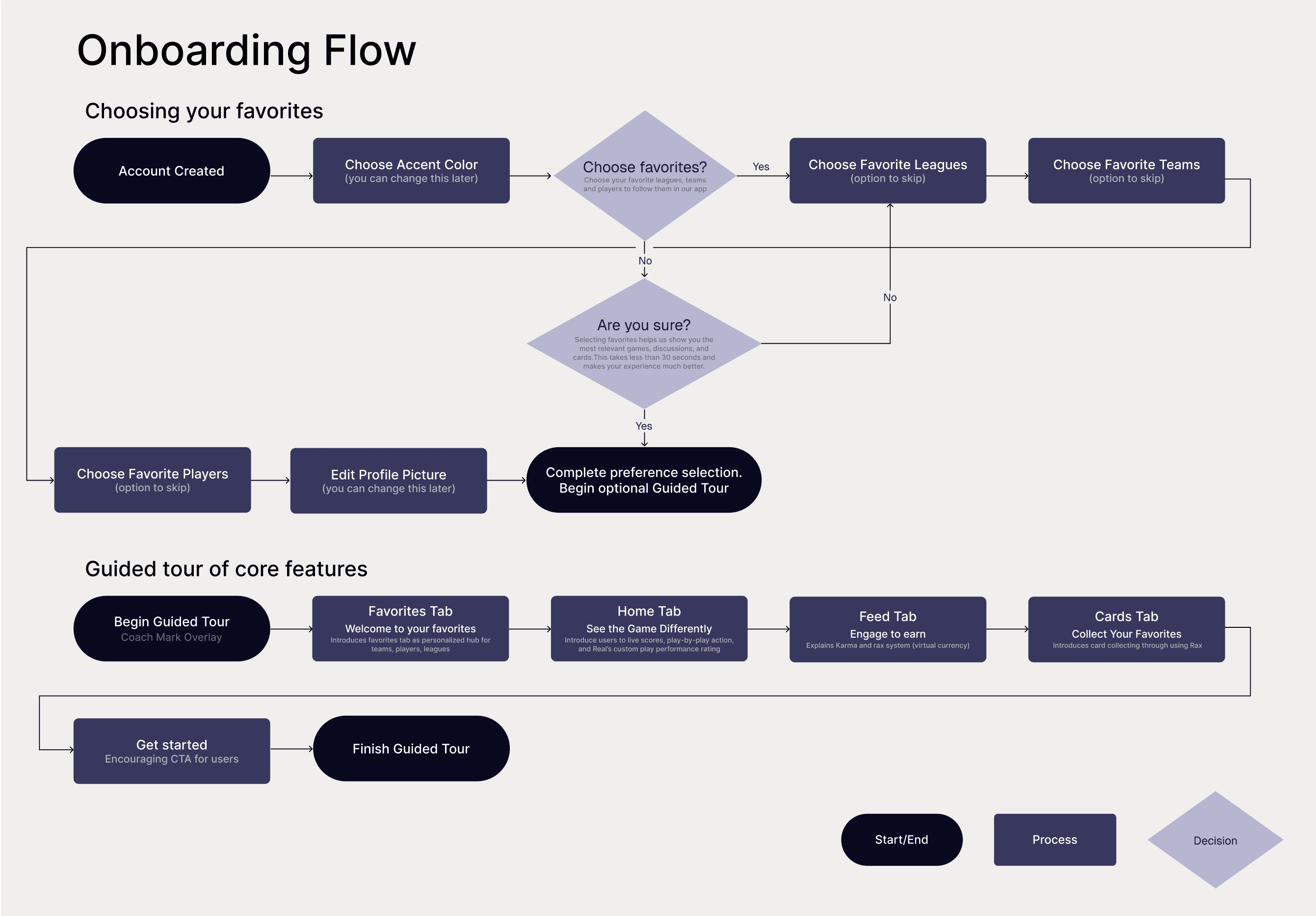
Real originally dropped users into the app with zero context, leaving them to figure out complex concepts like Karma, Rax, and card collecting through trial and error. I redesigned the initial experience into a progressive onboarding flow that builds understanding without overwhelming.
The new approach introduces real's features gradually:
Personalization first. Users select favorite teams, leagues, and players so their feed feels relevant immediately, creating instant investment in the platform
Lightweight customization. Simple profile setup (colors, photo) builds ownership without creating friction or decision fatigue
Contextual feature education. Get introduced to Real’s core features through a short, in-context guided tour. Each feature is surfaced naturally where it’s most relevant, instead of explained all at once.
Clearer Navigation
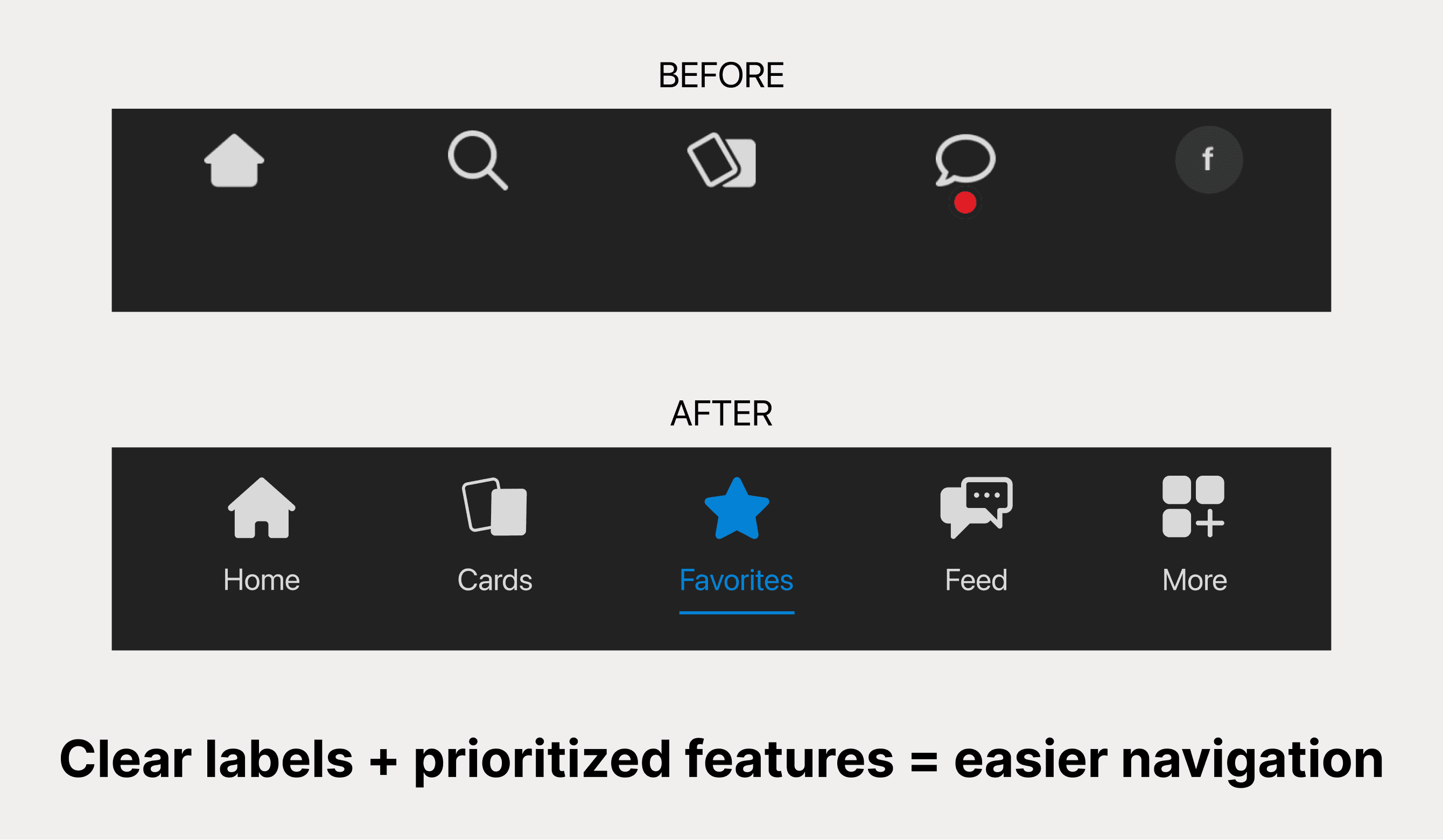
The original bottom navigation was Real’s biggest barrier to entry. Five mysterious icons sat like an unsolved puzzle, leaving users to guess what each one did. The solution seemed obvious: add text labels. But which features deserved precious navigation real estate?
I explored three options:
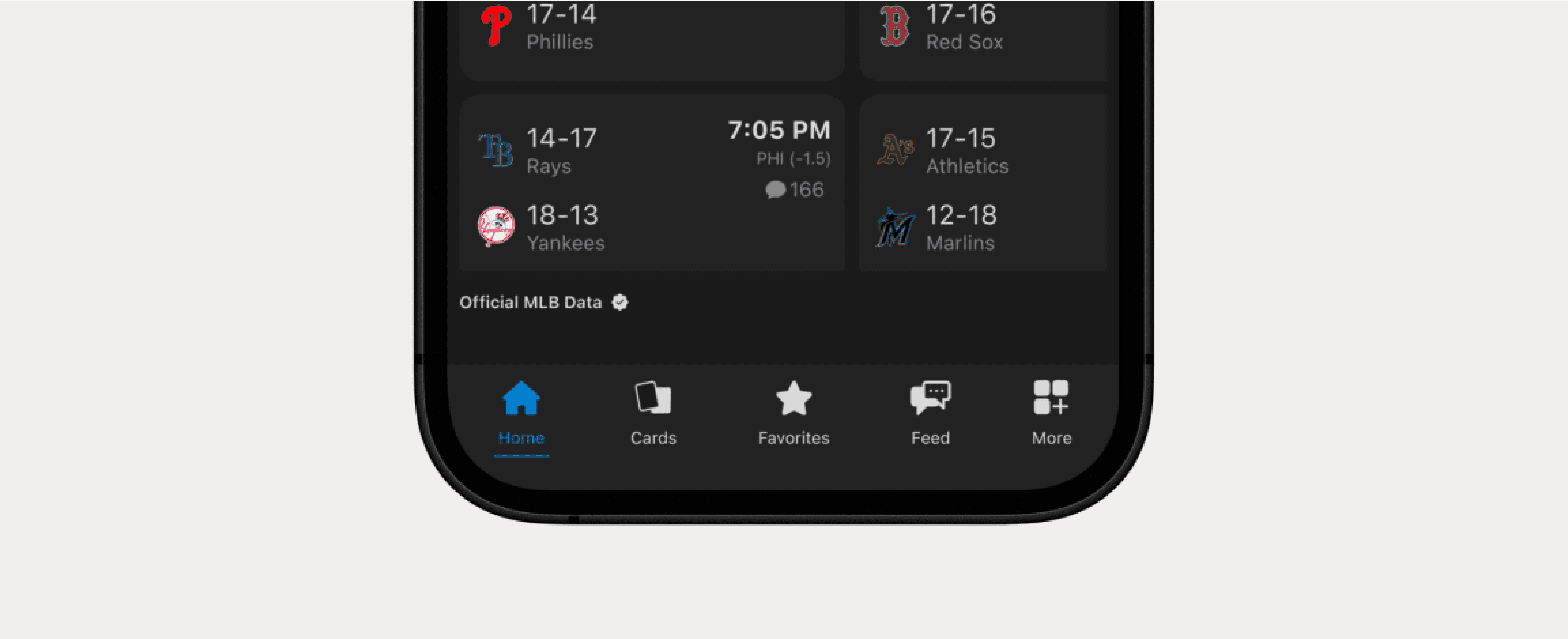
Option A: Keep 5 icons but add text labels.
Option B: Collapse into 4 core icons for simplicity.
Option C: Add a dedicated Favorites tab for personalization.
Combining Option A and Option C gave me a clear winner.
Teaching Features Without Disrupting Engagement
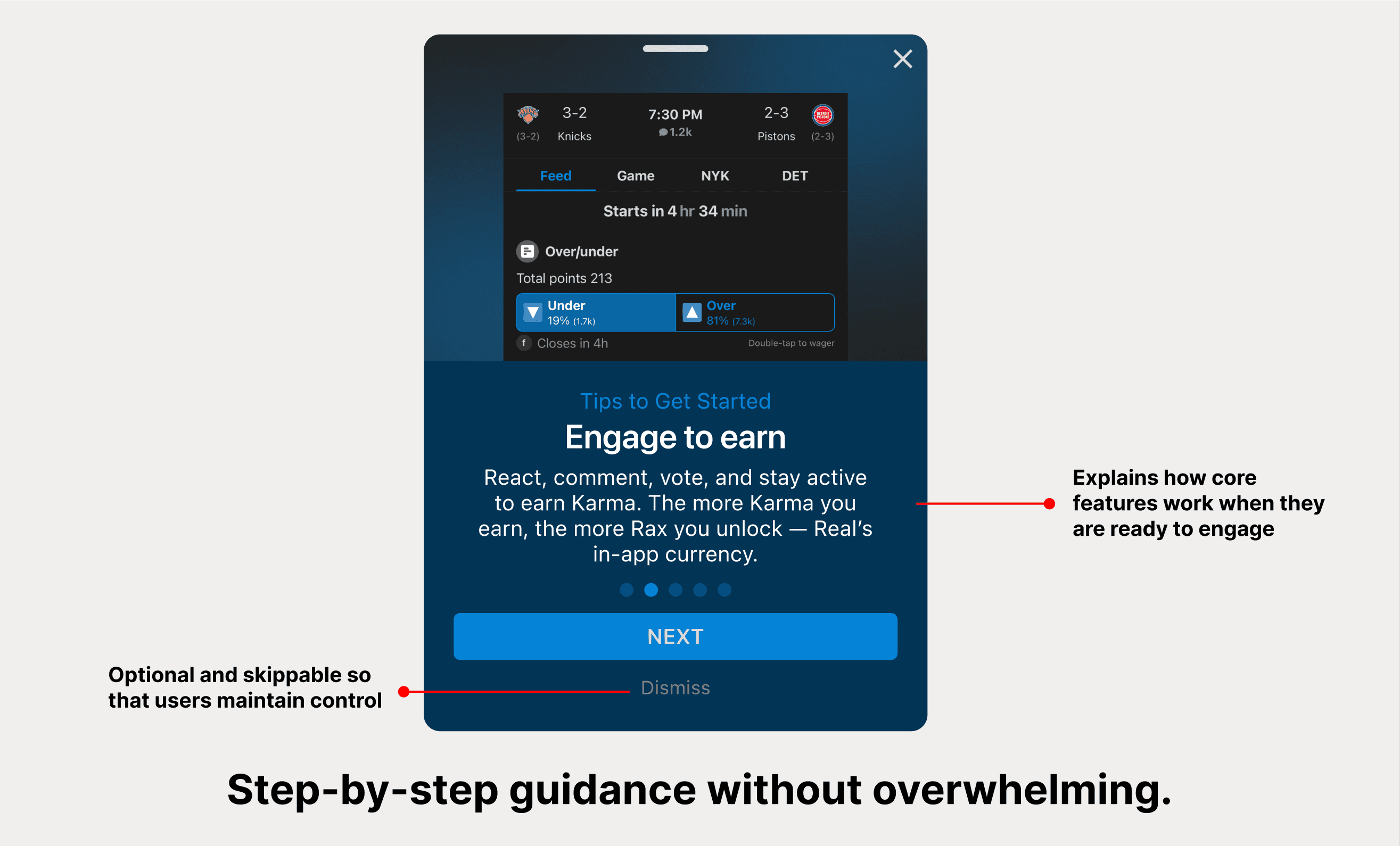
Users loved earning Rax through engagement, but many discovered the feature months in… if at all. Traditional onboarding risked interrupting their main goal (live sports engagement), while no education meant continued confusion.
After experimenting with different approaches, instead of explaining features upfront, I surfaced guided tips while users were already interacting with live games. This made learning feel like natural discovery, not homework.
Giving Content Room to Breathe
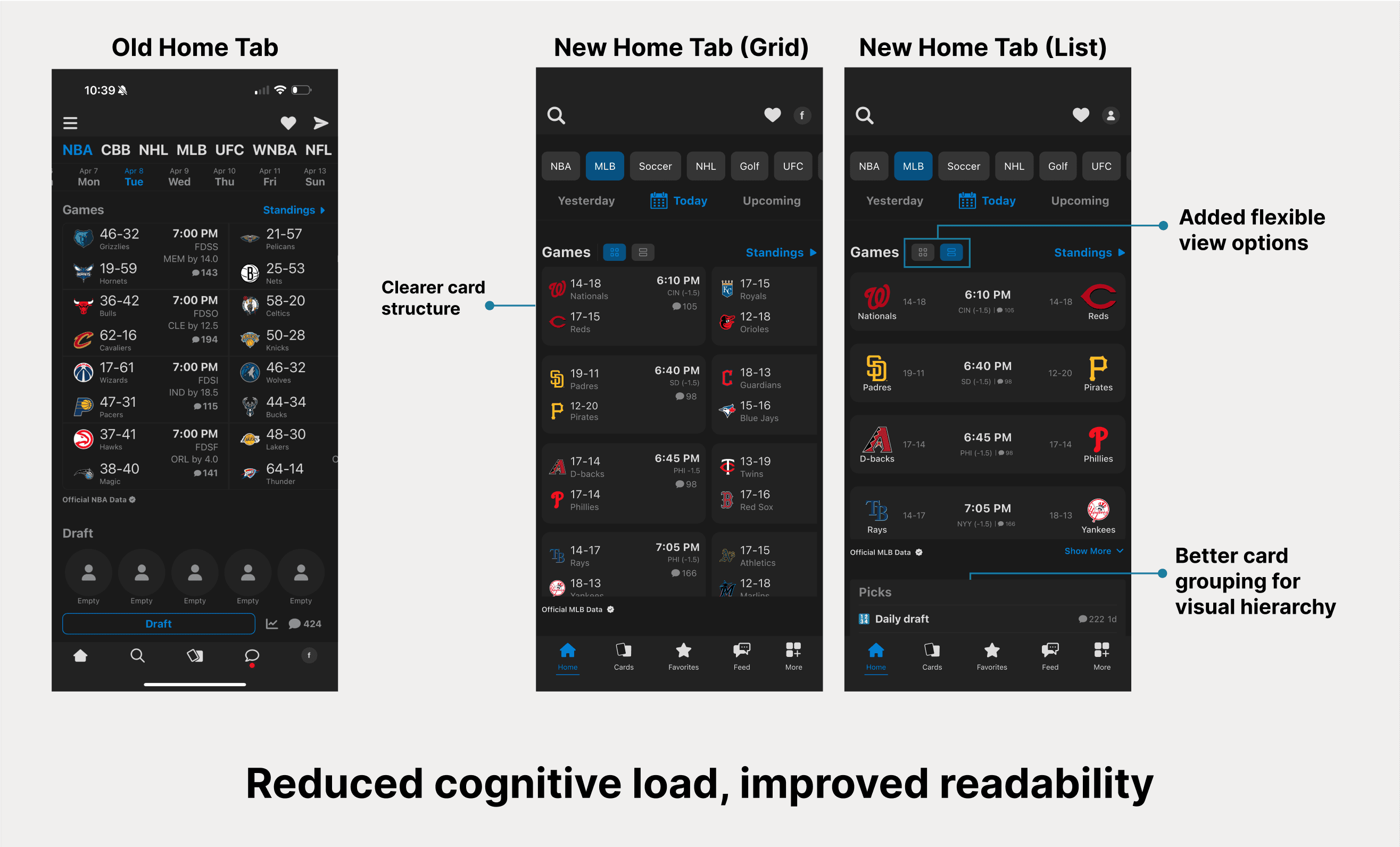
The cramped, competing information that users called "overwhelming" got reorganized into clear sections with distinct purposes. Game cards became more scannable with flexible viewing options, giving users the option to switch between list and grid views depending on how much detail they want to see at once. Social content found logical groupings, and betting information got proper visual hierarchy.
Elevating Favorites Into Their Own Space
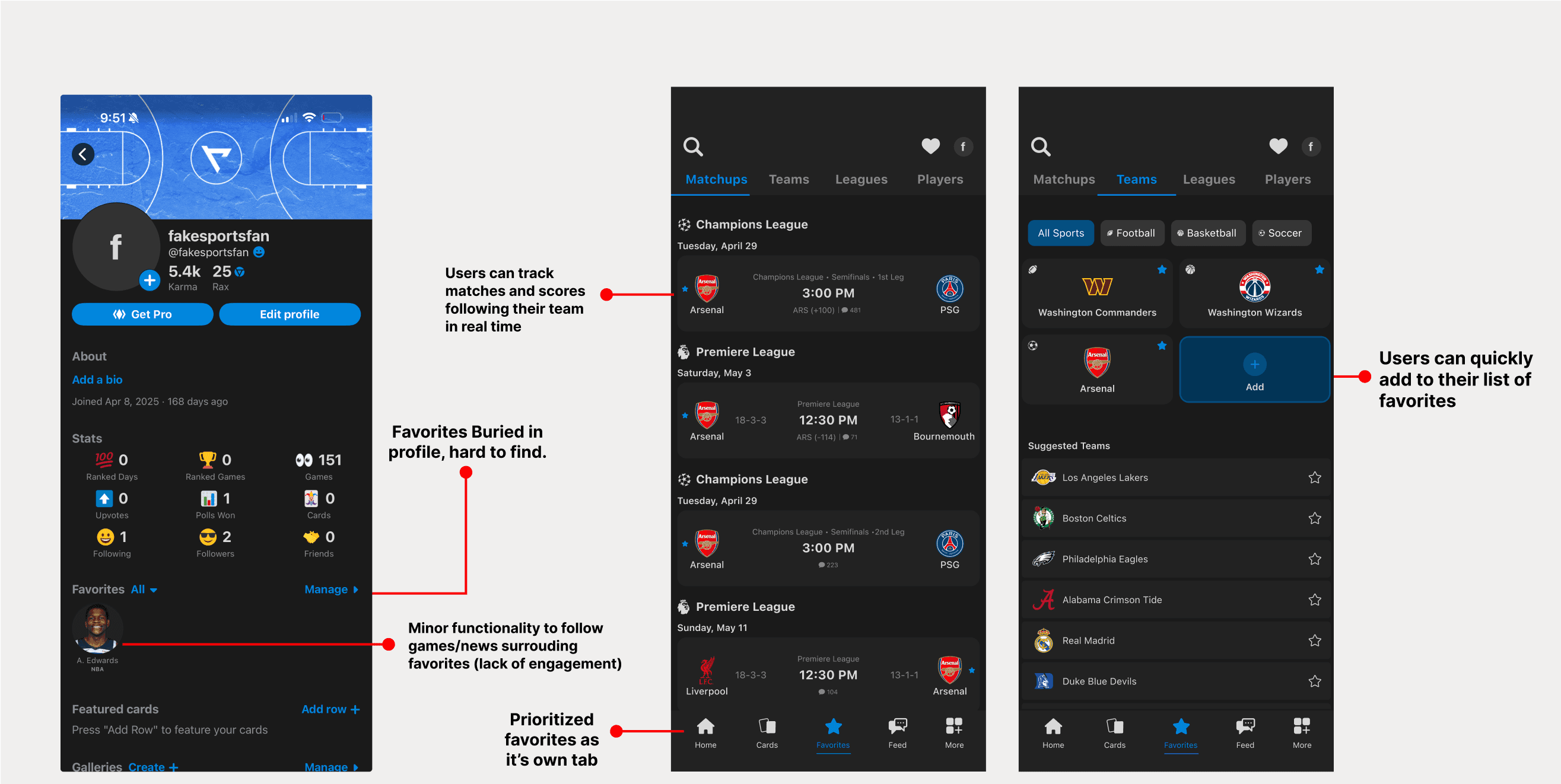
Originally, users could only track their favorites from their profile menu, with minor functionality. Meanwhile, the home screen tried to show everything to everyone.
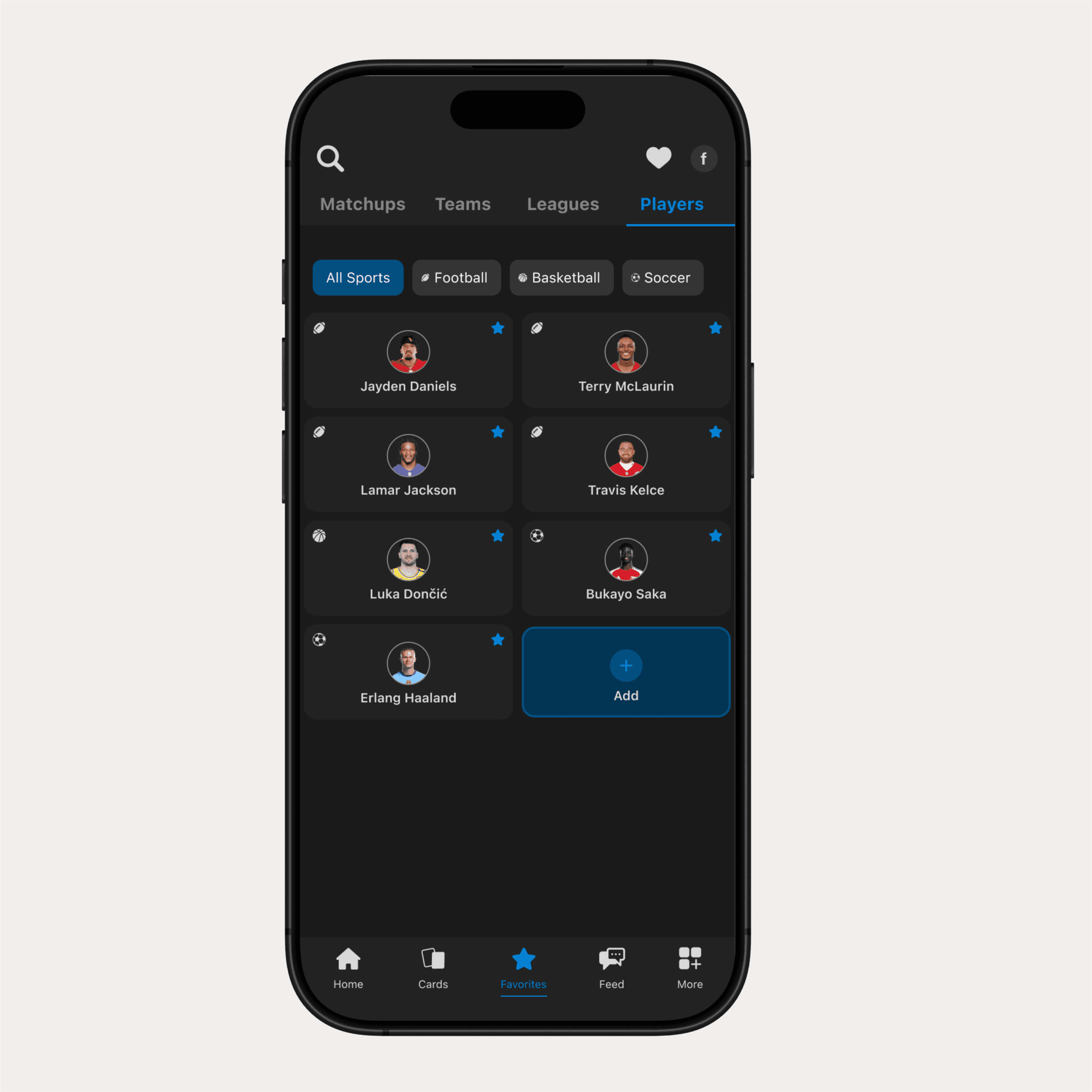
I separated these concerns: Home showcases live games and trending content for discovery, while Favorites provides a dedicated space for tracking your teams across different contexts. This gave users both broad sports coverage and personalized depth.
The Solution
Guiding User Experience Through Strategic Navigation and Progressive Feature Discovery
After sign-up, instead of dropping users straight into the app, I created a systematic approach that introduces Real's unique value progressively. The redesigned experience starts with personalized setup (selecting favorite teams and leagues), then guides users through their tailored sports content and contextual feature discovery.
By adding clear navigation labels, streamlining information hierarchy, and timing educational moments when users are naturally engaged, the solution transforms first-day confusion into confident exploration of what makes Real different from every other sports app.
Making Onboarding Meaningful Through A Personalized Experience
Introduced a progressive flow that helps users select favorite teams, leagues, and players immediately after signup, creating personalized content feeds from day one while building investment in the platform before overwhelming them with complex features.
Jumpstarting Feature Discovery
Redesigned how key features like Rax earning, Karma systems, and card collecting are introduced through contextual moments when users are naturally engaging with live games, replacing confusing upfront explanations with timely, relevant education.
Improved Navigation & Visual Hierarchy
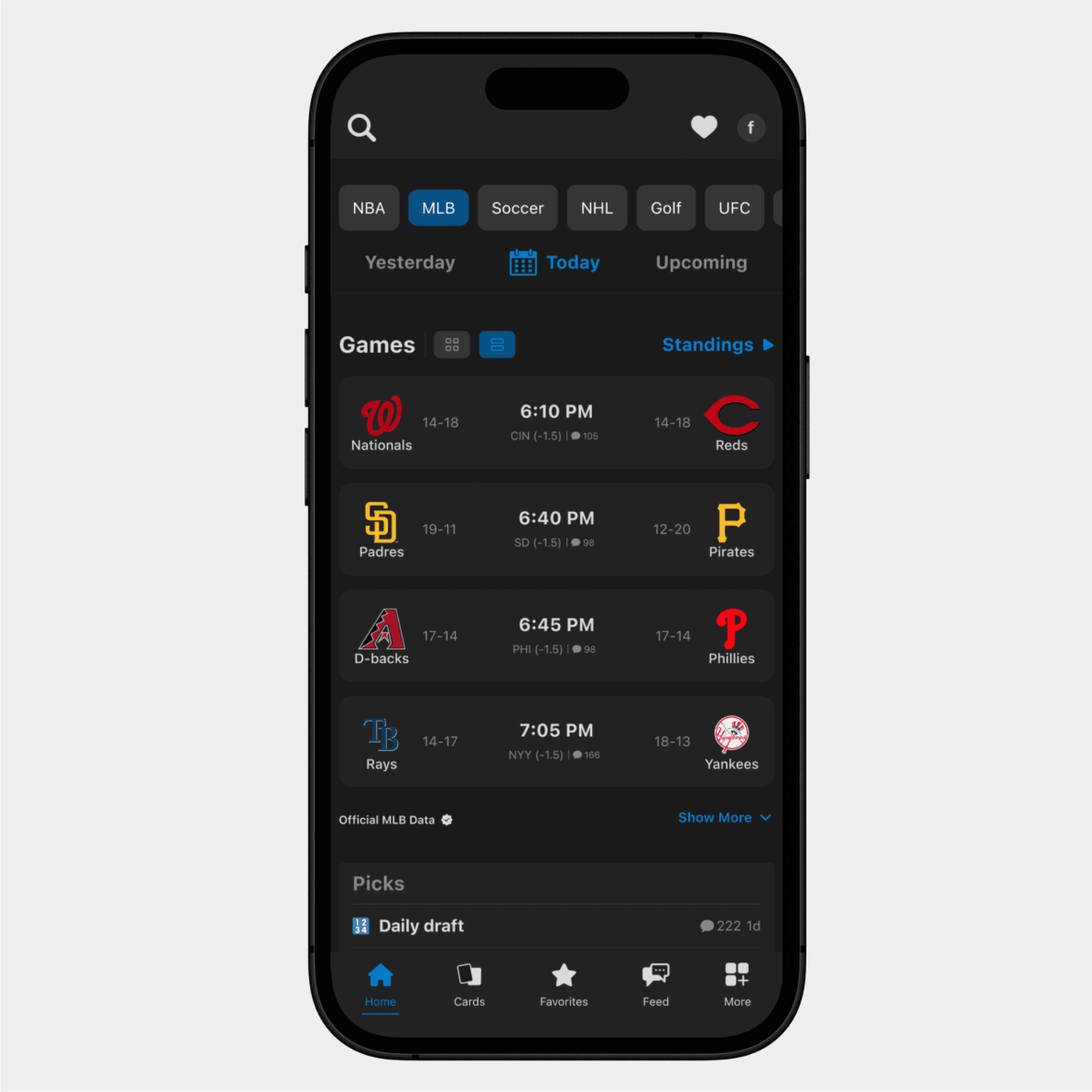
Added descriptive text labels to bottom navigation and restructured information hierarchy on the homepage, eliminating the guesswork that left users tapping randomly and creating predictable pathways to core content and features.
A Brand-New Favorites Tab
Created a dedicated space where users can track all their personalized content—favorite teams' upcoming games, recent results, player updates, and league standings—in one centralized location instead of hunting through profile menus and scattered interface elements.
Reflection
What I Learned and What I'd Do Differently
The Biggest Insight:
Onboarding isn't just nice-to-have education, it's the bridge between product potential and user success.
Users weren't abandoning Real, but they were completely missing the unique features that made Real special, like card collecting and the Karma system. People would download the app for live sports updates and stay engaged with that basic functionality. It made me realize that good design isn't just about making things look nice, it's about helping users discover the full value of what you've built.
What I'd explore further:
If I had more time, I'd want to A/B test different onboarding timing approaches. Does the guided tour work better after users' first live game interaction, or right after they've completed the sign up process? I'd also investigate whether power users (those already familiar with fantasy sports and sports betting) need different educational paths than casual fans.
The design challenge that surprised me:
Balancing Real's feature richness with cognitive load reduction. The temptation was to simplify by removing features, but the solution was reorganizing and contextualizing them better. This taught me that complexity isn't always the enemy but managing the complexities itself.
What I learned through this project:
This was my first time designing for such feature-dense social platform, which pushed me to think more systematically about information architecture and user mental models. I also got better at translating user frustration into specific design opportunities rather than just identifying problems.